
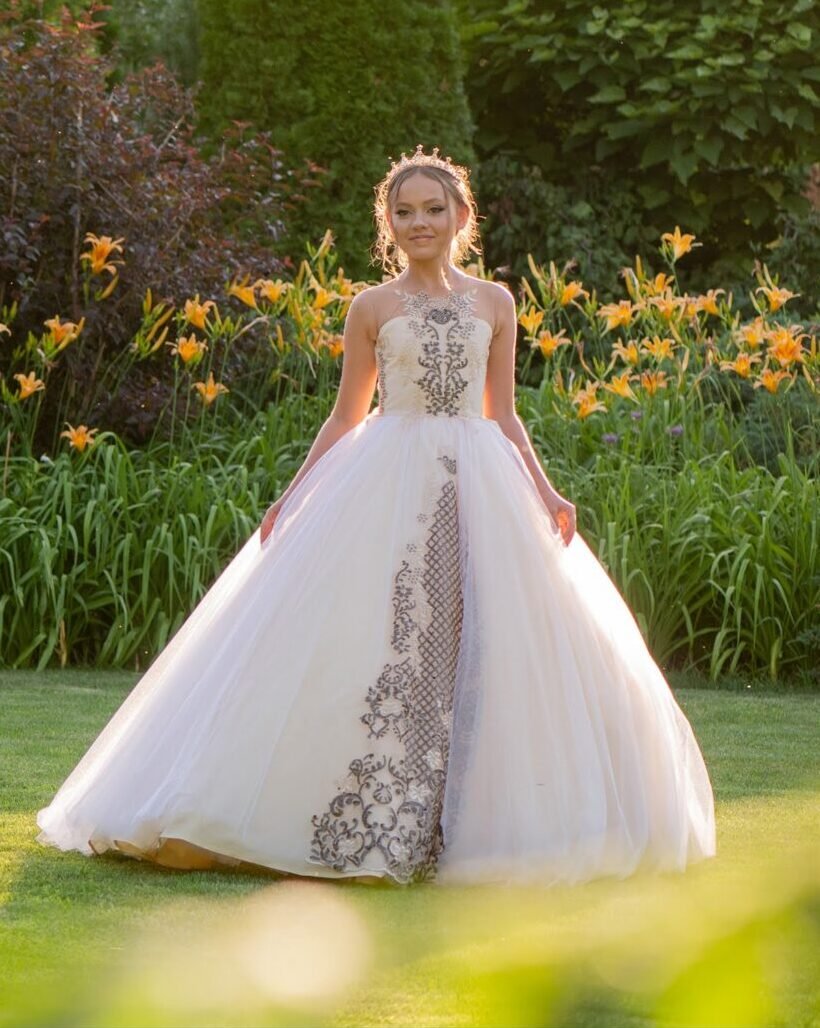
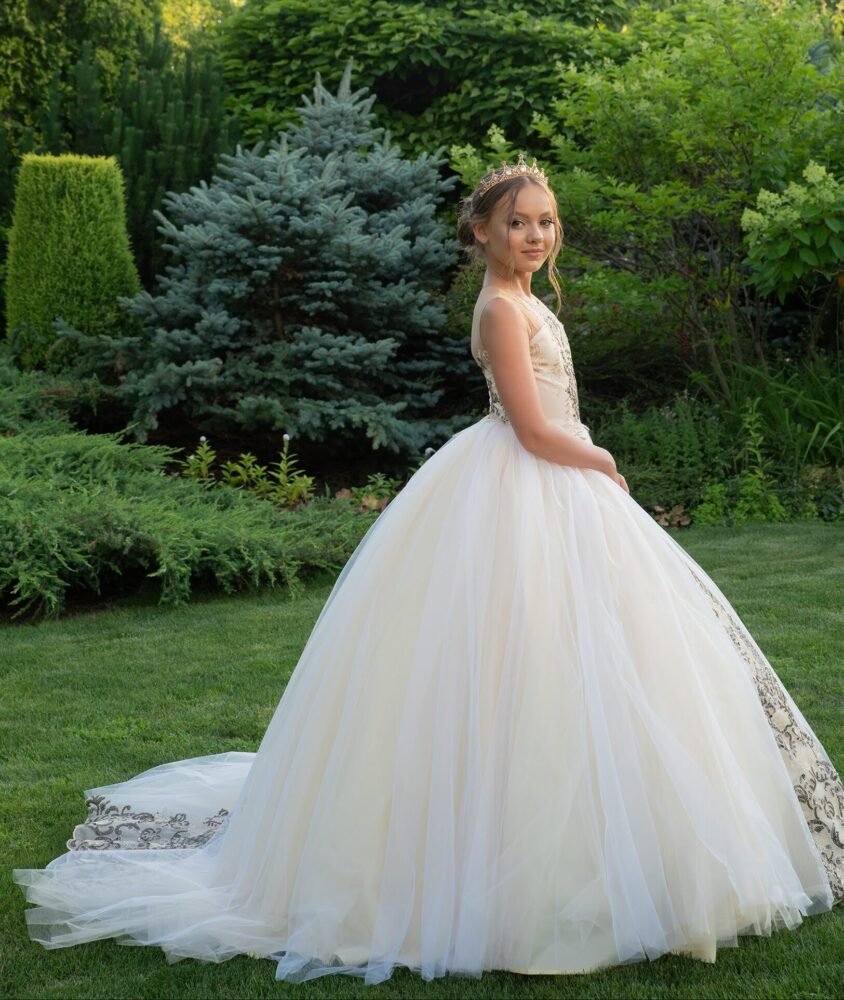
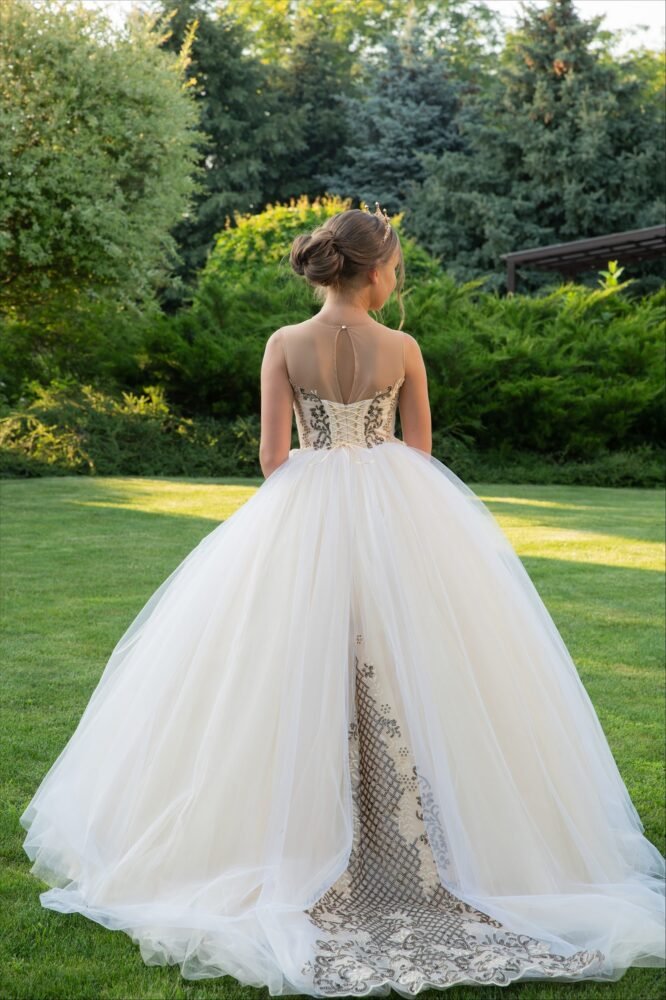
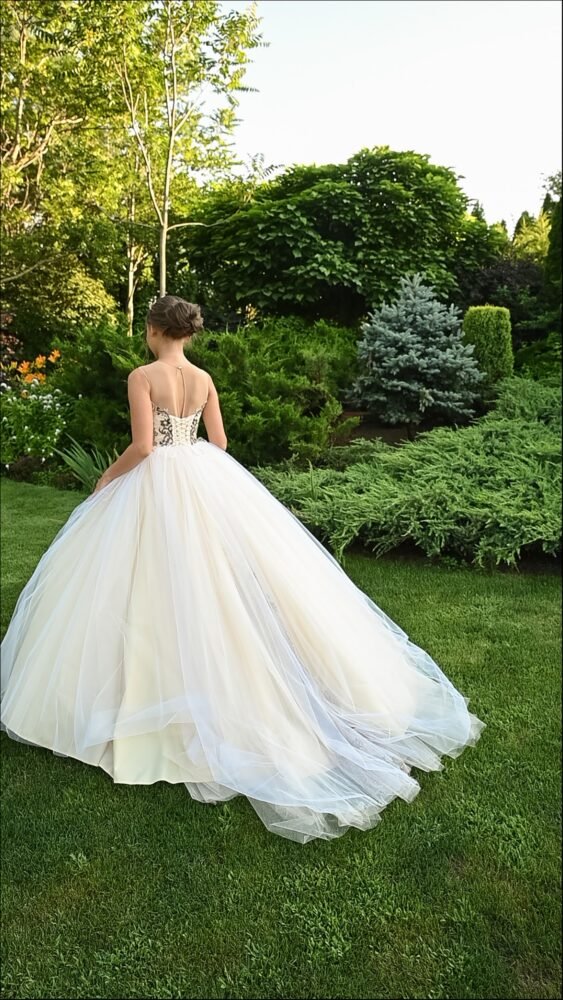
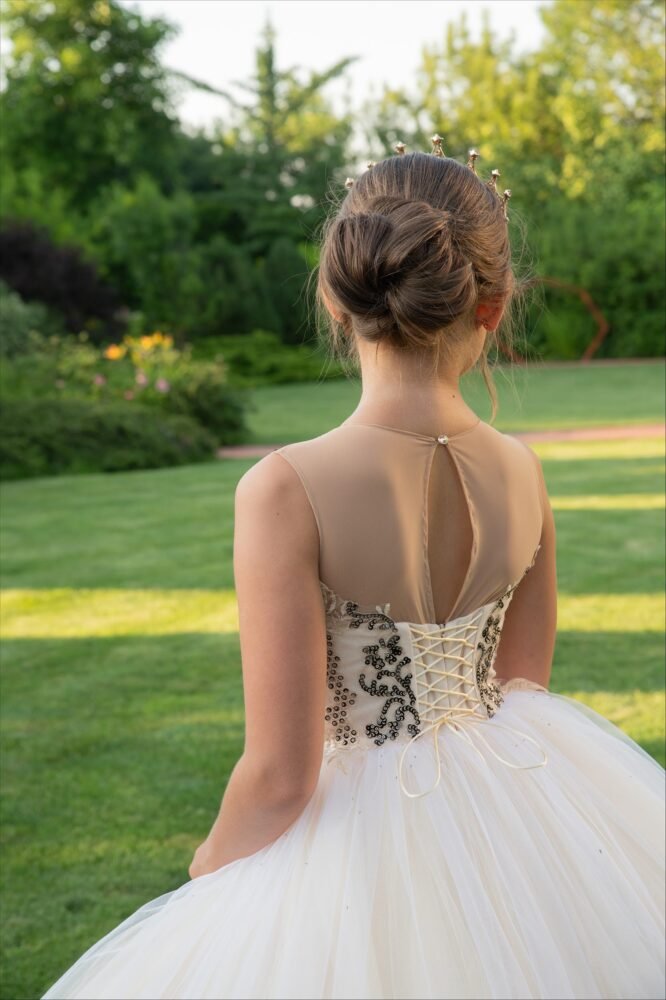
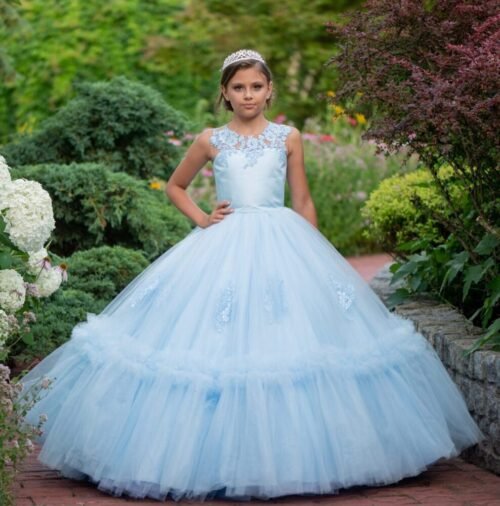
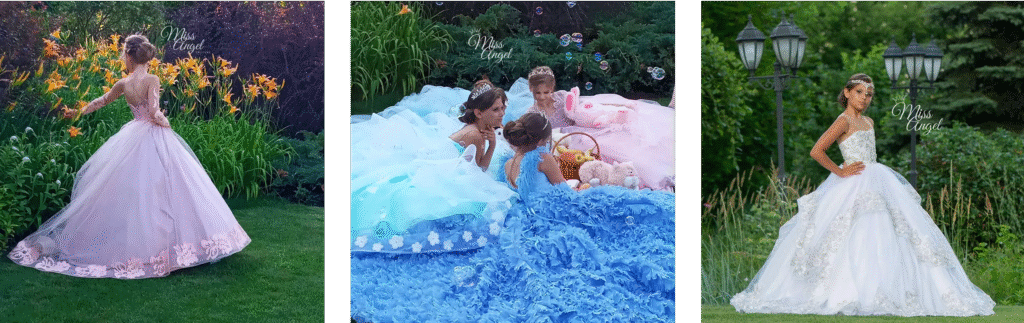
The Elisabeth gown is a striking fusion of elegance and contrast. Designed in crisp white with bold dark embroidery, this floor-length ball gown features a fitted bodice with delicate straps and a voluminous tulle skirt that flows with grace. The vertical embroidery adds regal structure, while the matching tiara completes the look with royal flair.
Photographed in a lush garden with blooming lilies and vintage lanterns, Elisabeth is ideal for:
- Flower girl appearances
- Birthday parties
- Fantasy and editorial photoshoots
- Quinceañeras and formal celebrations
Crafted for girls aged 3–10, this gown offers couture-level craftsmanship, lightweight comfort, and unforgettable style.


![Hoy do gmail and outlook use different type of server for emails? Yes, Gmail and Outlook use fundamentally different types of email servers and infrastructure, reflecting their distinct ecosystems and philosophies: 🛠️ Server Types and Protocols Feature Gmail (Google) Outlook (Microsoft) Email Server Type Google Mail servers (Gmail SMTP, IMAP, POP) Microsoft Exchange servers (Outlook.com, Office 365) Primary Protocols IMAP, POP3, SMTP Exchange ActiveSync, IMAP, POP3, SMTP Enterprise Backend Google Workspace Microsoft 365 / Exchange Online Authentication OAuth 2.0, 2FA OAuth 2.0, 2FA, Conditional Access Storage Integration Google Drive OneDrive 🔍 Key Differences Gmail is built around IMAP for syncing across devices and uses Google’s proprietary infrastructure. It’s optimized for search, labels (instead of folders), and integration with Google Workspace tools like Docs, Calendar, and Meet. Outlook (especially in enterprise settings) often runs on Microsoft Exchange, which supports Exchange ActiveSync—a protocol that offers deeper integration with calendars, contacts, and tasks. Outlook also supports IMAP and POP for compatibility. Gmail’s servers are globally distributed across Google’s cloud infrastructure, while Outlook’s servers may be hosted on Microsoft’s Azure cloud or on-premises Exchange servers depending on the setup. 🧠 Strategic Implications for You Since you're building a multilingual WooCommerce shop with luxury branding, this matters if you're: Automating transactional emails: Gmail’s SMTP is straightforward, but Outlook with Exchange can offer richer calendar/task integration. Managing multiple accounts: Gmail’s label system is more flexible for multilingual workflows; Outlook’s folder structure is more traditional. Choosing hosting or email plugins: Some WooCommerce plugins behave differently depending on whether you're using Gmail SMTP vs. Outlook/Exchange. If you’re integrating email into your shop’s backend or CRM, I can help you choose the best protocol or plugin for your stack. Want to dive into that next? how to say that one of my collagues met you at formnext 2024 Here are a few polished ways to say that, depending on the tone and context you're aiming for: ✉️ Professional & Neutral "One of my colleagues had the opportunity to meet you at Formnext 2024." 🤝 Friendly & Engaging "A colleague of mine met you at Formnext 2024 and spoke highly of the interaction." 🧠 Strategic & Contextual (great for outreach or follow-up) "Following my colleague’s meeting with you at Formnext 2024, I wanted to reach out and continue the conversation." 🌍 Multilingual Option (Spanish) "Uno de mis compañeros tuvo el gusto de conocerte en Formnext 2024." If you're writing an email or LinkedIn message and want to build rapport or reference a specific topic discussed at the event, I can help you craft that too. Just let me know the tone or goal—networking, partnership, follow-up, etc. We are a casting and machining company and we are interested on the technology. Check grammar Here’s a polished version of your sentence: "We are a casting and machining company, and we are interested in the technology." ✅ Grammar Fixes: Changed "on" to "in" — the correct preposition for expressing interest. Added a comma after "company" for clarity and flow (optional but recommended in formal writing). If you’re writing this as part of an email or introduction, I can help you expand it into a more compelling message. Just let me know the tone—formal, friendly, or technical—and the specific technology you're referring to. Inquiry Here’s a refined version of your email inquiry, tailored for a casting and machining company expressing interest in Cold Spray Technology: Subject: Re: Cold Spray Technology Dear [Recipient's Name], I hope this message finds you well. We are a casting and machining company, and we are very interested in Cold Spray Technology and its potential applications within our production workflow. One of my colleagues had the pleasure of meeting you at Formnext 2024 and spoke highly of your insights. We would appreciate the opportunity to learn more about your solutions and explore possible synergies. Could you please share any technical documentation, case studies, or product specifications that would help us better understand your offering? Looking forward to your response. Best regards, Xabier Urrutxua Garay [Your Company Name] [Contact Information] Would you like to add a specific question, request a demo, or mention a particular application area (e.g., aerospace, tooling, repair)? I can tailor it further. Also, what kind of spraying materials can be used on this kind of alloys? Check grammar Here’s a grammatically correct and polished version of your sentence: "Also, what kinds of spraying materials can be used on these types of alloys?" ✅ Improvements: "Kinds" instead of "kind" — plural form matches "materials." "These types of alloys" instead of "this kind of alloys" — ensures agreement between demonstrative and noun. Optional: You could say "compatible with these alloys" for a more technical tone. If you’re referring to Cold Spray Technology, I can help you list common materials used (like aluminum, copper, titanium, etc.) and which alloys they bond well with. Want to include that in your inquiry or explore compatibility charts? how to add my company email to have both emails together To manage both your personal and company email accounts together—whether in Gmail or Outlook—you can set them up so they sync and send from one interface. Here's how to do it for each platform: 📧 In Gmail: Add Your Company Email (e.g., xabier.ug@baydagroup.com) You’ve already started this setup, so here’s how to finalize it: ✅ To send and receive from both addresses: Go to Settings → Accounts and Import. Under "Send mail as", click "Add another email address". Enter your name and company email. Use SMTP settings: SMTP Server: smtp.hostinger.com Port: 465 Encryption: SSL Username: xabier.ug@baydagroup.com Password: your mailbox password Under "Check mail from other accounts", click "Add a mail account". Use POP settings: POP Server: pop.hostinger.com Port: 995 Encryption: SSL Select “Leave a copy on the server” and “Always use a secure connection”. Now Gmail will send and receive from both addresses, and you can choose which one to reply from. 📨 In Outlook Web: Add Your Company Email If you're using Outlook Web (Outlook.com or Office 365), you can either: Option 1: Add as a connected account Go to Settings → View all Outlook settings → Mail → Sync email. Under Connected accounts, click Add a connected account. Enter your company email and credentials. Use the same POP/SMTP settings as above. Option 2: Add as a shared mailbox (if permissions are granted) Right-click Folders in the left pane. Select “Add shared folder”. Enter the company email address. Click Add—it will appear in your sidebar. Would you like a unified signature setup or automatic reply rules for both accounts? I can help you configure that too. in my outlook application I have added my other email: xabier@centricast.com When I send an email, the receiver see xabier@Centricast as email sender. I want them to see Xabier Urrutxua as a sender To make sure recipients see "Xabier Urrutxua" instead of just your email address when you send from xabier@centricast.com, you’ll need to update the display name in Outlook. Here's how to do it: 🛠️ Change Display Name in Outlook (Classic Desktop App) Open Outlook. Go to File → Account Settings → Account Settings. In the Email tab, select your account (xabier@centricast.com) and click Change. In the User Information section, update the Your Name field to: Xabier Urrutxua Click Next, then Finish, and restart Outlook. ✅ This change will ensure that recipients see “Xabier Urrutxua” as the sender name instead of just your email address. ⚠️ If You're Using Outlook Web or Microsoft Exchange If your account is managed via Microsoft Exchange, only your IT administrator can change the display name. If you're using Outlook Web, go to Settings → Mail → Sync Email → and check the connected account settings. Some display name options may be limited depending on the account type. Would you like help checking if your account is Exchange-based or IMAP/POP? That affects whether you can change the name yourself or need admin access. I don't see this option Thanks for checking, Xabier. Since you're using Outlook Web and you've added xabier@centricast.com as a secondary account, the ability to change the display name (what recipients see in the "From" field) depends on how the account was added and what type it is. 🧩 Here's what you can try: ✅ If it's a Microsoft-hosted account (Outlook.com or Microsoft 365): Go to Microsoft Account Profile. Sign in with the account linked to xabier@centricast.com. Under "Your info", click Edit name. Update your name to Xabier Urrutxua, then click Save. 🕒 Changes may take up to 24 hours to reflect in outgoing emails. 🛠️ If it's an IMAP/SMTP account (e.g., hosted by Hostinger, Zoho, etc.): Outlook Web doesn’t let you change the display name directly for IMAP accounts. Instead, you’ll need to: Remove the account from Outlook Web. Re-add it manually, and during setup: Look for a field labeled "Your Name" or "Display Name". Enter Xabier Urrutxua there. This name will then appear in the "From" field of emails you send. If you’re unsure whether xabier@centricast.com is Exchange-based or IMAP, I can help you check that. Or if you prefer using the Outlook desktop app, you’ll have more control over display name settings there. Want me to walk you through that setup step-by-step? Create alt text, descriptive title, description and caption for this image metadata in a website. Absolutely, Xabier. Here's a refined set of metadata for your product image—tailored for SEO, accessibility, and luxury branding on your WooCommerce site: 🖼️ Alt Text Ornate pastel drawstring pouch with floral embellishments, lace embroidery, and pom-pom handle. ✅ Optimized for screen readers and SEO. Describes visual elements without being overly poetic. 🏷️ Descriptive Title Pastel Floral Embellished Drawstring Pouch – Miss Angel Couture ✅ Clear, brand-aligned, and keyword-rich for search indexing. 📄 Description This handcrafted drawstring pouch features a delicate arrangement of pastel fabric flowers, each adorned with rhinestone centers. The body is wrapped in metallic-thread embroidery and lace detailing, offering a luxurious texture. Finished with a soft pink cord and a whimsical pom-pom handle, this accessory is perfect for special occasions, gifting, or bridal styling. ✅ Rich in sensory language, materials, and use cases—ideal for product pages and SEO. 💬 Caption A romantic blend of florals, lace, and shimmer—crafted for elegance in every detail. ✅ Short, emotionally resonant, and perfect for visual storytelling on gallery or product pages. Would you like multilingual versions for your Arabic or Spanish audiences? I can translate and localize them for better reach and conversion. create description, short description, title and tags separated by comas. They need to be for the forntend of the website. great SEO, and have emojis in the text for it to look better. Absolutely, Xabier. Here's a frontend-ready metadata set for your product page—optimized for SEO, multilingual appeal, and visual charm. This is tailored for your luxury celebration accessories brand: 🏷️ Title Pastel Floral Embellished Drawstring Pouch 🌸✨ – Miss Angel Couture 📄 Short Description A romantic pouch adorned with pastel flowers 🌷, lace embroidery 🧵, and a pom-pom handle 🎀—perfect for weddings, gifting, or elegant evenings 💫. 📃 Full Description Step into elegance with this handcrafted drawstring pouch 💐. Featuring soft pastel fabric flowers with rhinestone centers 💎, metallic-thread embroidery ✨, and delicate lace detailing 👗, it’s a celebration of texture and charm. The pink drawstring cord and pom-pom bead handle add a whimsical touch 🎀. Ideal for bridal styling, luxury gifting, or special occasions where every detail matters 💖. 🏷️ Tags drawstring pouch, pastel handbag, floral pouch, bridal accessory, luxury gift bag, lace embroidery, pom-pom handle, wedding clutch, handmade pouch, Miss Angel Couture, elegant evening bag, celebration accessory, romantic handbag, rhinestone flowers, couture pouch Would you like me to generate the Arabic or Spanish version next for multilingual SEO? Or batch this format for other products in your collection? what is a cartflow? CartFlows is a powerful sales funnel and checkout optimization plugin for WooCommerce that helps you turn your online store into a high-converting machine 🚀. 🧩 What CartFlows Does Replaces the default WooCommerce checkout with sleek, branded, distraction-free layouts. Builds sales funnels with upsells, downsells, and order bumps to increase your average order value 💰. Recovers abandoned carts and tracks conversions with built-in analytics 📊. Works with page builders like Elementor, Divi, and Gutenberg for full design control 🎨. 🔧 Key Features Feature Benefit One-click upsells Boost revenue by offering add-ons after purchase Order bumps Show small add-on offers right on the checkout page A/B split testing Test different funnel versions to see what converts best Dynamic offers Personalize upsells based on customer behavior Checkout editor Customize form fields and layout for better UX Pre-built templates Launch funnels quickly with conversion-optimized designs 💼 Why It Matters for You Since you're building a luxury multilingual WooCommerce shop, CartFlows can help you: Guide customers through a curated buying journey—perfect for high-end accessories and celebration wear. Offer complementary products (e.g., matching hairpieces or jewelry) with upsells and order bumps. Recover lost sales with cart abandonment recovery tools. Create localized funnels for Arabic, Spanish, or English audiences with tailored messaging. Would you like help setting up your first funnel or customizing the checkout experience to match your brand’s elegance? I can walk you through it step-by-step. Create description and short description, title and tags separated by comas for this hair jewelry Here’s a beautifully branded, SEO-optimized metadata set for your hair jewelry product—perfect for the frontend of your Miss Angel Couture site, complete with emojis for visual appeal and multilingual charm: 🏷️ Title Pastel Floral Crown Braid Hairpiece](https://missangelcouture.com/wp-content/uploads/2025/09/Hair-accessory-1-scaled-500x667.jpg)

